International student settling-in platform
Active developmentLandedUK
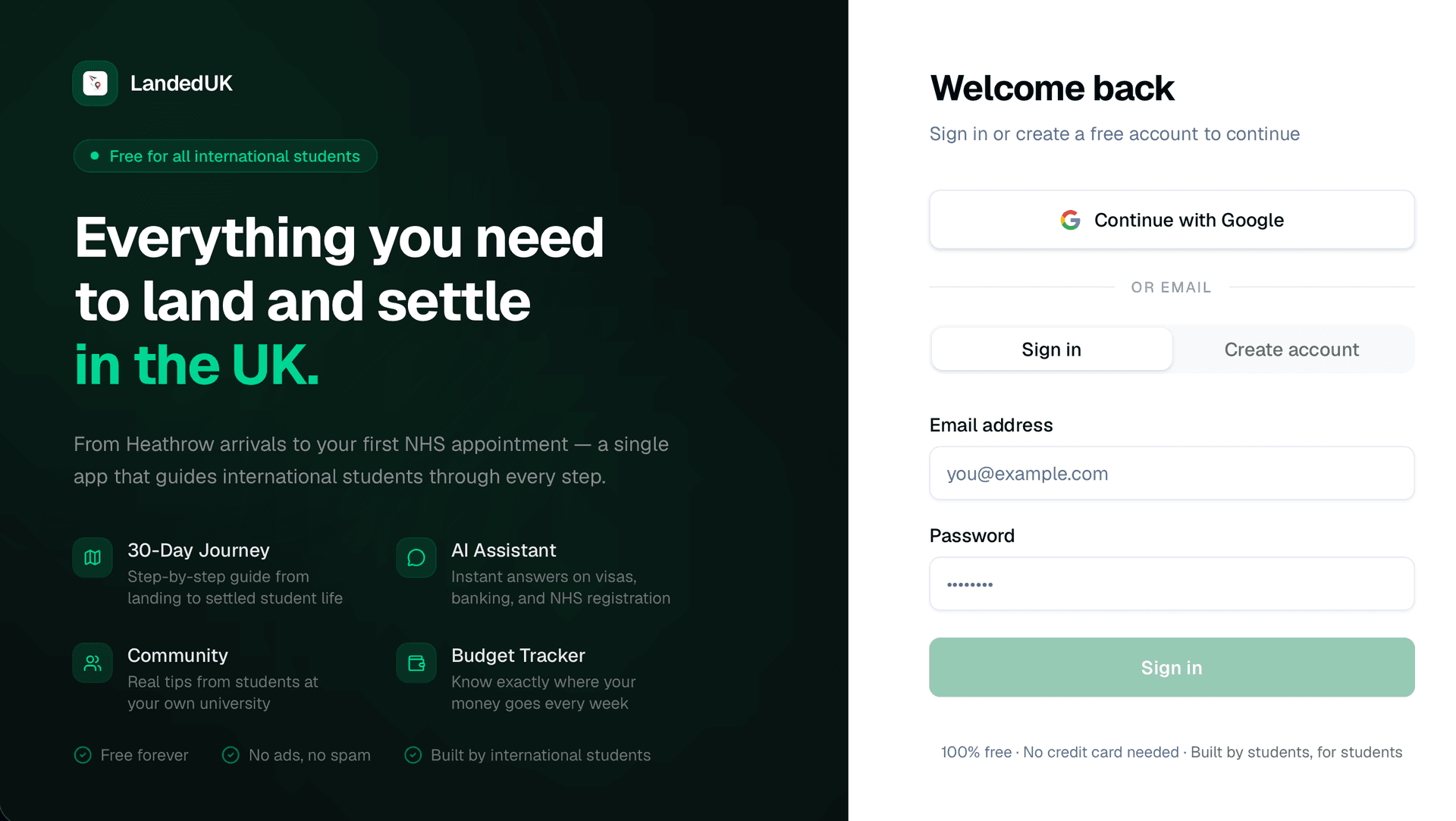
A responsive companion that brings together a guided first-month journey, practical guidance, budgeting, documents, maps, community support, messaging, and personalised AI assistance.
- My role
- Full-stack developer — independent project
- Development status
- Active development
- Intended users
- International students preparing to arrive in the UK
The context
Problem being solved
International students arriving in the UK often need to coordinate unfamiliar administrative tasks, local information, budgets, documents, and community support across disconnected sources.
Audience
Intended users
- International students preparing to arrive in the UK
- New arrivals working through their first month
- Students seeking practical peer guidance and local services
My role and contribution
Full-stack developer — independent project
- Designed and built the guided onboarding, AI assistant, community, budgeting, document, mapping, and messaging experiences.
- Connected Supabase authentication, Postgres data, realtime messaging and notifications, storage, and Row Level Security.
- Added student-verification, moderation, privacy, block, and report workflows for community features.
Development status
The application is deployed and its broad feature set is documented, but it remains an actively developed portfolio project without a claim of verified production adoption.
Main features
Sequential 30-day settling-in journey with task progress and personalised AI guidance.
Budget tracking, document vault, expiry reminders, shop guidance, maps, and community tips.
Realtime messages and notifications with student verification, reporting, blocking, and admin moderation.
Technical architecture
The application combines a Next.js interface with Supabase data, realtime communication and storage, plus external AI and mapping services.
- 01
Student experience
Next.js + TypeScript
Guided journey, assistant, budget, documents, community, maps, and messages.
- 02
Application services
App Router
Coordinates profile-aware guidance, community actions, verification, and moderation.
- 03
External services
Pollinations + OpenStreetMap
Provides personalised AI responses, places, and map data.
- 04
Platform data
Supabase
Handles authentication, Postgres records, RLS, realtime events, and file storage.
Technology breakdown
A recruiter-focused view of the main technical responsibilities and service boundaries.
Frontend technology
Next.js, TypeScript, Tailwind CSS, shadcn/ui, Framer Motion, Leaflet, and Recharts support the multi-feature student experience.
- Responsive onboarding, assistant, community, budget, document, and message views
- Leaflet maps and Recharts budget visualisation
- Reusable interface patterns for tasks, notifications, profiles, verification, and moderation
Backend technology
Application logic connects personalised guidance, community workflows, realtime communication, verification, and administration.
- Profile data shapes the guided journey and AI assistant context
- Realtime workflows support messages, notifications, and verification results
- Admin operations support verification review, content moderation, and reports
Database and storage
Supabase provides Postgres, Realtime, and Storage for student profiles, progress, community data, communication, and documents.
- Postgres stores profiles, journey state, spending, posts, messages, and moderation records
- Storage supports documents, community photos, and student-verification uploads
- Realtime events power communication and notification updates
External integrations
Free-tier services support AI guidance, maps, local place discovery, charts, and deployment.
- Pollinations AI for profile-aware assistance
- Leaflet with OpenStreetMap and Overpass API
- Recharts for spending breakdowns and Vercel for deployment
Authentication and security
Supabase authentication, Row Level Security, privacy controls, and moderation workflows protect personal and community data.
- Row Level Security protects database and storage access
- Community posting is gated behind a completed profile
- Messaging includes privacy, block, and report controls
- Student verification and content reports use restricted admin review queues
Testing, accessibility and performance
Testing approach
- The repository provides lint, local-development, and production-build workflows.
- Manual scenarios should cover onboarding progression, profile personalisation, budget entries, documents, community permissions, messages, reports, and verification review.
- Permission checks should include private documents, blocked users, incomplete profiles, storage access, and non-admin moderation attempts.
Accessibility considerations
- Keep the 30-day journey understandable without depending on animation or colour.
- Provide labelled controls and clear errors for budgets, documents, profiles, and verification.
- Ensure messaging, community actions, maps, and admin workflows remain keyboard accessible.
- Use readable language for students who may be unfamiliar with UK terminology.
Performance considerations
- Load maps, charts, messaging, and document features only when their views are needed.
- Optimise community images and limit realtime subscriptions to active conversations or notifications.
- Keep external AI and place requests from blocking core guidance and stored content.
Learning and next steps
What I learned
- A broad support product needs clear information hierarchy so urgent arrival tasks are not lost among optional tools.
- Personalised assistance should use structured profile context while still protecting private data.
- Community and messaging features require moderation and privacy to be designed alongside the feature itself.
What I would improve next
- Add automated permission, storage, messaging, and journey-progression tests.
- Validate guidance with international students and review time-sensitive content regularly.
- Add monitoring and clearer recovery states for realtime, AI, and mapping services.
Project gallery
Screenshots from the current project build.
Interactive preview
Load the live project directly on this page. Requires an active deployment.
Interactive preview available
Loads the live site inside this page. Click to activate — the project must be publicly accessible.
Explore the build
Live demo and source code
Review the current interface or inspect the repository and documented implementation.